Post processing
Besides plotting the result, it is also possible to query numerical results. We’ll go through them with a simple example.
from anastruct import SystemElements
import matplotlib.pyplot as plt
import numpy as np

ss = SystemElements()
element_type = 'truss'

# create triangles
x = np.arange(1, 10) * np.pi
y = np.cos(x)
y -= y.min()
ss.add_element_grid(x, y, element_type=element_type)

# add top girder
ss.add_element_grid(x[1:-1][::2], np.ones(x.shape) * y.max(), element_type=element_type)

# add bottom girder
ss.add_element_grid(x[::2], np.ones(x.shape) * y.min(), element_type=element_type)

# supports
ss.add_support_hinged(1)
ss.add_support_roll(-1, 2)

# loads
ss.point_load(node_id=np.arange(2, 9, 2), Fy=-100)

ss.solve()
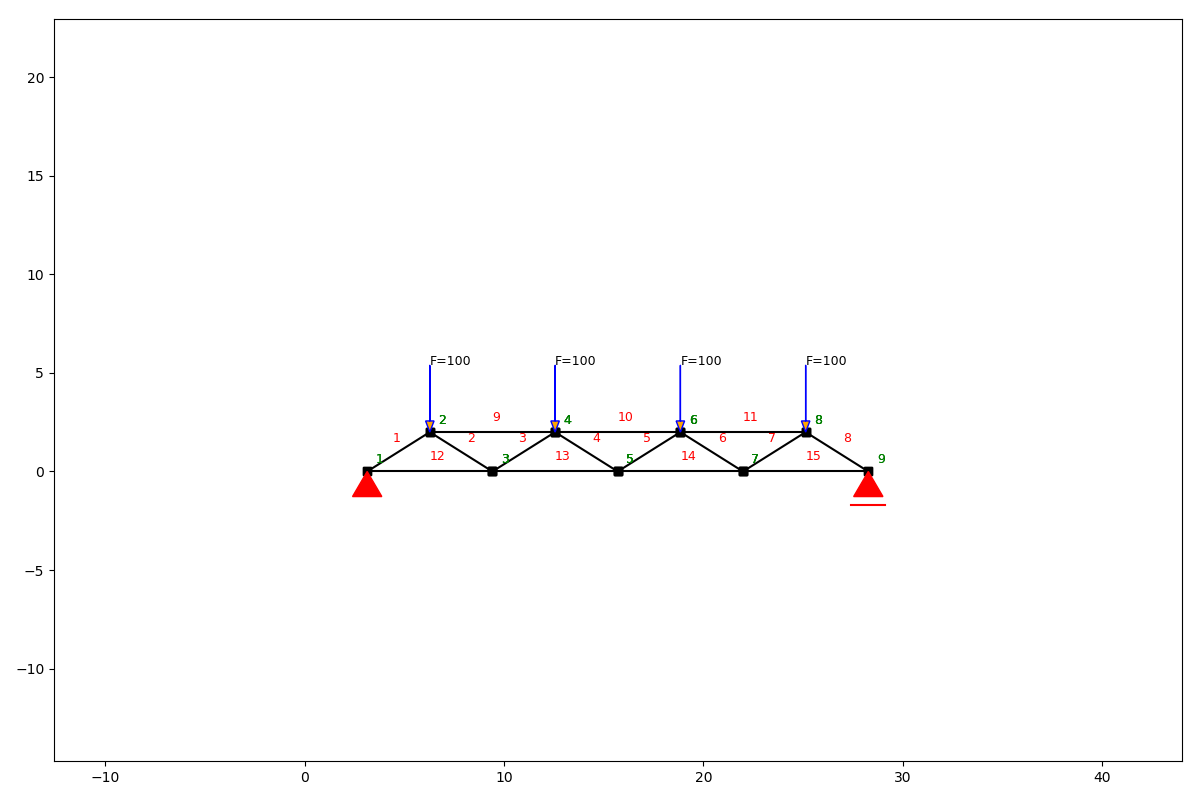
ss.show_structure()
Node results system
- SystemElements.get_node_results_system(node_id=None)[source]
Get the node results. These are the opposite of the forces and displacements working on the elements and may seem counter intuitive.
- Args:
- node_id (int, optional): The node’s ID. If node_id == None or 0, the results of all nodes are returned.
Defaults to None.
- Returns:
- Union[ List[Dict[str, Union[int, float]]], Dict[str, Union[int, float]] ]:
If node_id == 0, returns a list containing tuples with the results: [(id, Fx, Fy, Tz, ux, uy, phi_z), (id, Fx, Fy…), () .. ] If node_id > 0, returns a dict with the results: {“id”: id, “Fx”: Fx, “Fy”: Fy, “Tz”: Tz, “ux”: ux, “uy”: uy, “phi_z”: phi_z}
Example
We can use this method to query the reaction forces of the supports.
print(ss.get_node_results_system(node_id=1)['Fy'], ss.get_node_results_system(node_id=-1)['Fy'])
output
199.9999963370603 200.00000366293816
Node displacements
- SystemElements.get_node_displacements(node_id=None)[source]
Get the node displacements.
- Args:
- node_id (int, optional): The node’s ID. If node_id == None or 0, the results of all nodes are returned.
Defaults to None.
- Returns:
- Union[List[Dict[str, Any]], Dict[str, Any]]: If node_id == 0, returns a list containing
tuples with the results: [(id, ux, uy, phi_z), (id, ux, uy, phi_z), … (id, ux, uy, phi_z) ] If node_id > 0, returns a dict with the results: {“id”: id, “ux”: ux, “uy”: uy, “phi_z”: phi_z}
Example
We can also query node displacements on a node level (So not opposite, as with the system node results.) To get the maximum displacements at node 5 (the middle of the girder) we write.
print(ss.get_node_displacements(node_id=5))
output
{'id': 5, 'ux': 0.25637068208810526, 'uy': -2.129555426623823, 'phi_y': 7.11561178433554e-09}
Range of node displacements
- SystemElements.get_node_result_range(unit)[source]
Get the node results. Returns a list with the node results for a certain unit.
- Args:
unit (str): “uy”, “ux”, or “phi_z”
- Raises:
NotImplementedError: If the unit is not implemented.
- Returns:
List[float]: List with the node results for a certain unit.
Example
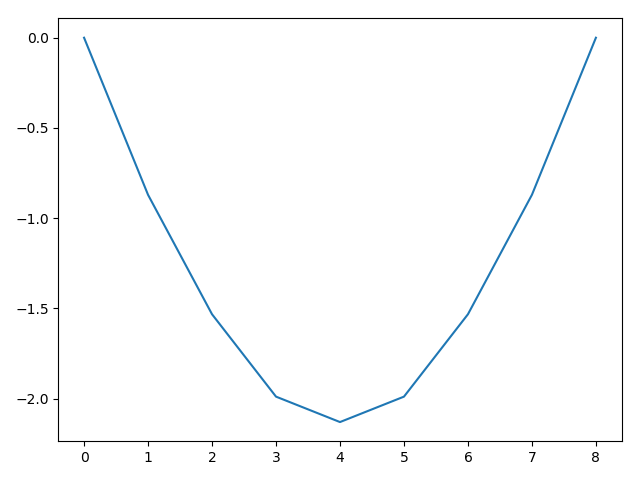
To get the deflection of all nodes in the girder, we use the get_node_result_range method.
deflection = ss.get_node_result_range('uy')
print(deflection)
plt.plot(deflection)
plt.show()
output
[-0.0, -0.8704241688181067, -1.5321803865868588, -1.9886711039126856, -2.129555426623823, -1.9886710728856773, -1.5321805004461058, -0.8704239570876975, -0.0]
Element results
- SystemElements.get_element_results(element_id=None, verbose=False)[source]
Get the element results.
- Args:
- element_id (int, optional): The element’s ID. If element_id == None or 0, the results of all elements
are returned. Defaults to None.
- verbose (bool, optional): If set to True, then numerical results for the deflection and the bending
moment are also returned. Defaults to False.
- Returns:
- Union[List[Dict[str, Any]], Dict[str, Any]]: If element_id == 0,
- returns a list containing dicts with the results: [{“id”: id, “length”: length, “alpha”: alpha,
“umax”: umax, “umin”: umin, “u”: u, “wmax”: wmax, “wmin”: wmin, “w”: w, “Mmin”: Mmin, “Mmax”: Mmax, “M”: M, “Qmin”: Qmin, “Qmax”: Qmax, “Q”: Q, “Nmin”: Nmin, “Nmax”: Nmax, “N”: N, “q”: q}, … ]
- If element_id > 0, returns a dict with the results: {“id”: id, “length”: length, “alpha”: alpha,
“umax”: umax, “umin”: umin, “u”: u, “wmax”: wmax, “wmin”: wmin, “w”: w, “Mmin”: Mmin, “Mmax”: Mmax, “M”: M, “Qmin”: Qmin, “Qmax”: Qmax, “Q”: Q, “Nmin”: Nmin, “Nmax”: Nmax, “N”: N, “q”: q}
Example
Axial force, shear force and extension are properties of the elements and not of the nodes. To get this information, we need to query the results from the elements.
Let’s find the value of the maximum axial compression force, which is in element 10.
print(ss.get_element_results(element_id=10)['N'])
output
-417.395490645013
Range of element results
- SystemElements.get_element_result_range(unit, minmax='abs')[source]
Get the element results. Returns a list with the min/max results of each element for a certain unit.
- Args:
unit (str): “shear”, “moment”, or “axial” minmax (str), optional: “min”, “max”, “abs”, or “both”. Defaults to “abs”.
Note that “both” returns a tuple with two values: (min, max)
- Raises:
NotImplementedError: If the unit is not implemented.
- Returns:
List[Union[float, Tuple[float]]]: List with min and/or max results of each element for a certain unit.
Example
We can of course think of a structure where we do not know where the maximum axial compression force will occur. So let’s check if our assumption is correct and that the maximum force is indeed in element 10.
We query all the axial forces. The returned item is an ordered list. Because Python starts counting from zero, and our elements start counting from one, we’ll need to add one to get the right element. Here we’ll see that the minimum force (compression is negative) is indeed in element 10.
print(np.argmin(ss.get_element_result_range('axial')) + 1)
output
10