Plotting
The SystemElements object implements several plotting methods for retrieving standard plotting results. Every plotting method has got the same parameters. The plotter is based on a Matplotlib backend and it is possible to get the figure and do modifications of your own. The x and y coordinates of the model should all be positive value for the plotter to work properly.
Note that plotting capabilities do require that anaStruct be installed with the “plot” sub-module (e.g. pip install anastruct[plot] )
Structure
- SystemElements.show_structure(verbosity=0, scale=1.0, offset=(0, 0), figsize=None, show=True, supports=True, values_only=False, annotations=False)[source]
Plot the structure.
- Args:
verbosity (int, optional): 0: All information, 1: Suppress information. Defaults to 0. scale (float, optional): Scale of the plot. Defaults to 1.0. offset (Tuple[float, float], optional): Offset the plots location on the figure. Defaults to (0, 0). figsize (Optional[Tuple[float, float]], optional): Change the figure size. Defaults to None. show (bool, optional): Plot the result or return a figure. Defaults to True. supports (bool, optional): Plot the supports. Defaults to True. values_only (bool, optional): Return the values that would be plotted as tuple containing
two arrays: (x, y). Defaults to False.
annotations (bool, optional): if True, structure annotations are plotted. It includes section name.
- Returns:
Figure: If show is False, return a figure.
Bending moments
- SystemElements.show_bending_moment(factor=None, verbosity=0, scale=1, offset=(0, 0), figsize=None, show=True, values_only=False)[source]
Plot the bending moment.
- Args:
factor (Optional[float], optional): Influence the plotting scale. Defaults to None. verbosity (int, optional): 0: All information, 1: Suppress information. Defaults to 0. scale (float, optional): Scale of the plot. Defaults to 1. offset (Tuple[float, float], optional): Offset the plots location on the figure. Defaults to (0, 0). figsize (Optional[Tuple[float, float]], optional): Change the figure size. Defaults to None. show (bool, optional): Plot the result or return a figure. Defaults to True. values_only (bool, optional): Return the values that would be plotted as tuple containing
two arrays: (x, y). Defaults to False.
- Returns:
Figure: If show is False, return a figure.
Axial forces
- SystemElements.show_axial_force(factor=None, verbosity=0, scale=1, offset=(0, 0), figsize=None, show=True, values_only=False)[source]
Plot the axial force.
- Args:
factor (Optional[float], optional): Influence the plotting scale. Defaults to None. verbosity (int, optional): 0: All information, 1: Suppress information. Defaults to 0. scale (float, optional): Scale of the plot. Defaults to 1. offset (Tuple[float, float], optional): Offset the plots location on the figure. Defaults to (0, 0). figsize (Optional[Tuple[float, float]], optional): Change the figure size. Defaults to None. show (bool, optional): Plot the result or return a figure. Defaults to True. values_only (bool, optional): Return the values that would be plotted as tuple containing
two arrays: (x, y). Defaults to False.
- Returns:
Figure: If show is False, return a figure.
Shear forces
- SystemElements.show_shear_force(factor=None, verbosity=0, scale=1, offset=(0, 0), figsize=None, show=True, values_only=False)[source]
Plot the shear force.
- Args:
factor (Optional[float], optional): Influence the plotting scale. Defaults to None. verbosity (int, optional): 0: All information, 1: Suppress information. Defaults to 0. scale (float, optional): Scale of the plot. Defaults to 1. offset (Tuple[float, float], optional): Offset the plots location on the figure. Defaults to (0, 0). figsize (Optional[Tuple[float, float]], optional): Change the figure size. Defaults to None. show (bool, optional): Plot the result or return a figure. Defaults to True. values_only (bool, optional): Return the values that would be plotted as tuple containing
two arrays: (x, y). Defaults to False.
- Returns:
Figure: If show is False, return a figure.
Reaction forces
- SystemElements.show_reaction_force(verbosity=0, scale=1, offset=(0, 0), figsize=None, show=True)[source]
Plot the reaction force.
- Return type:
Optional[Figure]
- Args:
verbosity (int, optional): 0: All information, 1: Suppress information. Defaults to 0. scale (float, optional): Scale of the plot. Defaults to 1. offset (Tuple[float, float], optional): Offset the plots location on the figure. Defaults to (0, 0). figsize (Optional[Tuple[float, float]], optional): Change the figure size. Defaults to None. show (bool, optional): Plot the result or return a figure. Defaults to True.
- Returns:
Figure: If show is False, return a figure.
Displacements
- SystemElements.show_displacement(factor=None, verbosity=0, scale=1, offset=(0, 0), figsize=None, show=True, linear=False, values_only=False)[source]
Plot the displacement.
- Args:
factor (Optional[float], optional): Influence the plotting scale. Defaults to None. verbosity (int, optional): 0: All information, 1: Suppress information. Defaults to 0. scale (float, optional): Scale of the plot. Defaults to 1. offset (Tuple[float, float], optional): Offset the plots location on the figure. Defaults to (0, 0). figsize (Optional[Tuple[float, float]], optional): Change the figure size. Defaults to None. show (bool, optional): Plot the result or return a figure. Defaults to True. linear (bool, optional): Don’t evaluate the displacement values in between the elements. Defaults to False. values_only (bool, optional): Return the values that would be plotted as tuple containing
two arrays: (x, y). Defaults to False.
- Returns:
Figure: If show is False, return a figure.
Save figure
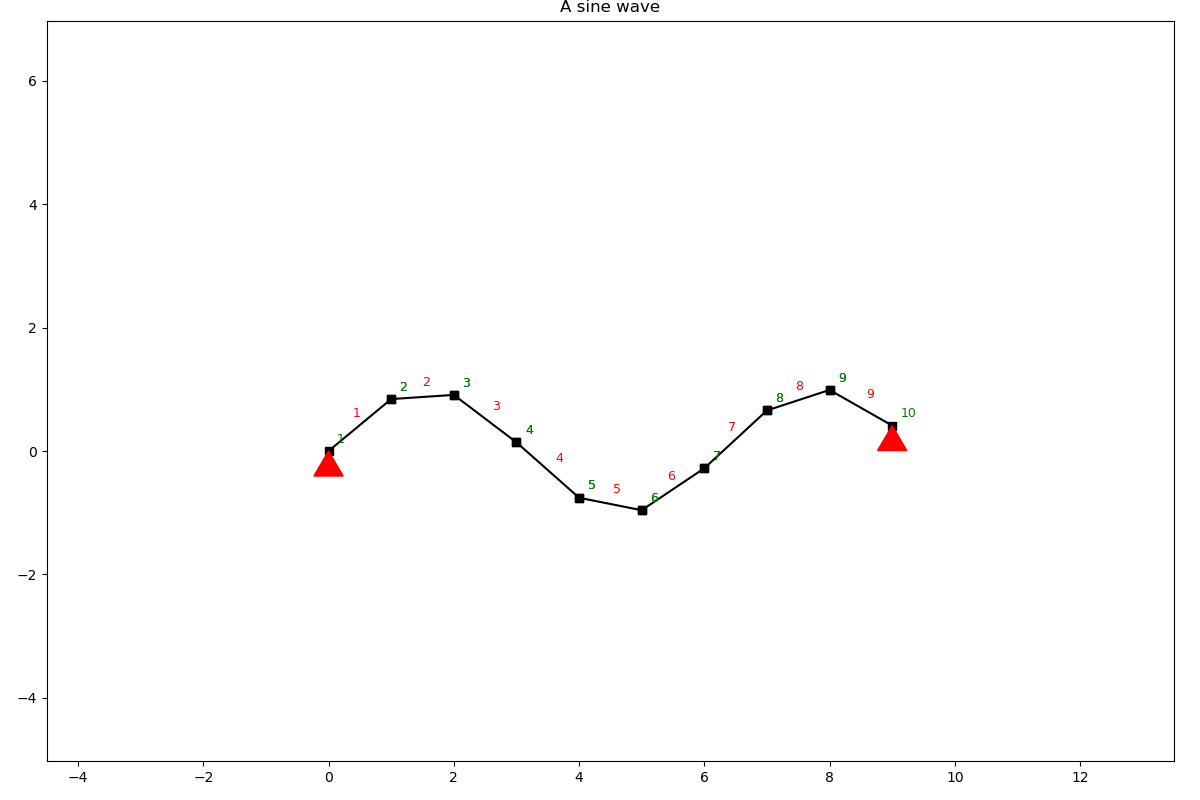
When the show parameter is set to False a Matplotlib figure is returned and the figure can be saved with proper titles.
from anastruct import SystemElements
import numpy as np
import matplotlib.pyplot as plt

x = np.arange(0, 10)
y = np.sin(x)

ss = SystemElements()
ss.add_element_grid(x, y)
ss.add_support_hinged(node_id=[1, -1])

fig = ss.show_structure(show=False)
plt.title('A sine wave')
plt.savefig('my-figure.png')